




के हवाइजहाज मोडले आईफोनमा स्थान बन्द गर्छ?

आधुनिक स्मार्टफोनहरूमा स्थान ट्र्याकिङ सबैभन्दा महत्त्वपूर्ण सुविधाहरू मध्ये एक हो। पालैपालो निर्देशनहरू प्राप्त गर्ने देखि नजिकैका रेस्टुरेन्टहरू फेला पार्ने वा साथीहरूसँग आफ्नो स्थान साझा गर्ने सम्म, आईफोनहरू सही र उपयोगी जानकारी प्रदान गर्न स्थान सेवाहरूमा धेरै निर्भर हुन्छन्। साथै, धेरै प्रयोगकर्ताहरू गोपनीयताको बारेमा चिन्तित हुन्छन् र उनीहरूको उपकरणले सक्रिय रूपमा आफ्नो स्थान कहिले साझा गरिरहेको छ भनेर जान्न चाहन्छन्। एउटा सामान्य प्रश्न यो हो कि एयरप्लेन मोड सक्षम गर्नाले आईफोनलाई तपाईंको स्थिति ट्र्याक गर्नबाट रोक्छ कि गर्दैन। एयरप्लेन मोडले केही वायरलेस जडानहरू असक्षम पारे पनि, स्थान सेवाहरूमा यसको प्रभाव सीधा छैन। यस लेखमा, हामी एयरप्लेन मोडले आईफोन स्थान ट्र्याकिङसँग कसरी अन्तरक्रिया गर्छ भनेर अन्वेषण गर्नेछौं, के सक्रिय रहन्छ र के असक्षम पारिएको छ भनेर व्याख्या गर्नेछौं।
१. के हवाइजहाज मोडले आईफोनमा स्थान बन्द गर्छ?
एयरप्लेन मोड मुख्यतया हवाई यात्राको लागि डिजाइन गरिएको हो, जसले सेलुलर सिग्नलहरूलाई विमानको सञ्चार प्रणालीमा हस्तक्षेप गर्नबाट रोक्नको लागि हो। सक्रिय हुँदा, यसले वायरलेस सञ्चारहरूलाई असक्षम पार्छ, जसमा समावेश छन्:
- सेलुलर कनेक्टिभिटी
- वाइफाइ (यद्यपि यसलाई म्यानुअली पुन: सक्षम गर्न सकिन्छ)
- ब्लुटुथ (म्यानुअली पुन: सक्षम गर्न पनि सकिन्छ)
धेरै मानिसहरूले एयरप्लेन मोडले स्थान ट्र्याकिङ स्वतः रोक्छ भन्ने अनुमान गर्छन्, तर वास्तविकता अझ सूक्ष्म छ। यहाँ विस्तृत विवरण दिइएको छ।
१.१ GPS सक्रिय रहन्छ
तपाईंको आईफोनमा बिल्ट-इन छ GPS चिप जुन सेलुलर, वाइफाइ, वा ब्लुटुथ नेटवर्कहरूबाट स्वतन्त्र रूपमा सञ्चालन हुन्छ। GPS ले पृथ्वीको परिक्रमा गर्ने उपग्रहहरूबाट संकेतहरू प्राप्त गरेर काम गर्छ। त्यसकारण, हवाइजहाज मोड सक्रिय हुँदा पनि, GPS ले अझै पनि तपाईंको स्थान निर्धारण गर्न सक्छ । यसको अर्थ एप्पल नक्सा वा स्ट्राभा जस्ता पूर्ण रूपमा GPS मा निर्भर एपहरूले काम गरिरहन सक्छन्, यद्यपि पूरक नेटवर्क-आधारित डेटा बिना शुद्धता थोरै घट्न सक्छ।
१.२ नेटवर्क-आधारित स्थान शुद्धता
आईफोनहरूले GPS सँग संयोजन गरेर स्थान शुद्धता सुधार गर्दछ वाइफाइ नेटवर्क र सेलुलर टावरहरू । यदि तपाईंले हवाइजहाज मोड सक्षम गर्नुभयो र Wi-Fi बन्द छोड्नुभयो भने, तपाईंको उपकरणले यी नेटवर्कहरूमा पहुँच गुमाउँछ। परिणामस्वरूप:
- स्थान कम सटीक हुन सक्छ।
- केही एपहरूले सटीक स्थान देखाउनुको सट्टा अनुमानित स्थान मात्र देखाउन सक्छन्
यद्यपि, तपाईंले हवाइजहाज मोड सक्रिय राख्दै म्यानुअल रूपमा Wi-Fi पुन: सक्षम गर्न सक्नुहुन्छ, जसले गर्दा तपाईंको आईफोनले सेलुलर डेटा सक्रिय नगरी राम्रो स्थान शुद्धताको लागि Wi-Fi नेटवर्कहरू प्रयोग गर्न सक्छ।
१.३ ब्लुटुथ र स्थान सेवाहरू
ब्लुटुथ अर्को कारक हो जसले सटीक स्थान पत्ता लगाउन योगदान पुर्याउँछ, विशेष गरी निकटता-आधारित सेवाहरूको लागि जस्तै मेरो खोज्नुहोस् , एयरड्रप , र सार्वजनिक स्थानहरूमा भित्री नेभिगेसन। पूर्वनिर्धारित रूपमा, हवाइजहाज मोडले ब्लुटुथलाई असक्षम पार्छ, जसले यी सुविधाहरूलाई असर गर्न सक्छ। यद्यपि, तपाईंले हवाइजहाज मोडमा रहँदा म्यानुअल रूपमा ब्लुटुथलाई फेरि सक्रिय गर्न सक्नुहुन्छ, यी स्थान-आधारित कार्यक्षमताहरू सुरक्षित राख्दै।
१.४ अनुप्रयोग-विशिष्ट प्रभावहरू
विभिन्न एपहरूले हवाइजहाज मोडमा फरक-फरक प्रतिक्रिया दिन्छन्:
- नेभिगेसन एपहरू : वास्तविक-समय ट्राफिक डेटा उपलब्ध नहुन सक्छ, यद्यपि GPS मात्र प्रयोग गरेर काम गर्न सक्छ।
- राइड-सेयरिङ र डेलिभरी एपहरू : वास्तविक-समय अद्यावधिकहरूको लागि सेलुलर वा वाइफाइ जडानहरू आवश्यक पर्दछ; तिनीहरू हवाइजहाज मोडमा राम्ररी काम नगर्न सक्छन्।
- फिटनेस र स्वास्थ्य ट्र्याकिङ एपहरू : GPS प्रयोग गरेर तपाईंको रुट ट्र्याक गर्न सकिन्छ, तर कनेक्टिभिटी पुनर्स्थापित नभएसम्म क्लाउड सेवाहरूमा सिङ्क गर्न ढिलाइ हुनेछ।
कुञ्जी टेकवे: हवाइजहाज मोडले स्थान सेवाहरूको शुद्धता कम गर्छ तर गर्छ स्थान ट्र्याकिङ पूर्ण रूपमा असक्षम नगर्ने । स्थानमाथि पूर्ण नियन्त्रणको लागि, प्रयोगकर्ताहरूले आईफोन सेटिङहरूमा स्थान सेवाहरू बन्द गर्नुपर्छ।
२. बोनस टिप: AimerLab MobiGo मार्फत आईफोनको स्थान परिवर्तन वा सच्याउनुहोस्
कहिलेकाहीँ, प्रयोगकर्ताहरूले स्थान-आधारित एपहरू परीक्षण गर्ने, क्षेत्र-विशिष्ट सामग्री पहुँच गर्ने, वा गोपनीयता कायम राख्ने जस्ता वैध कारणहरूका लागि आफ्नो आईफोन स्थान परिवर्तन वा सच्याउन चाहन्छन्। यो त्यहीं हो जहाँ AimerLab MobiGo आउँछ।
AimerLab MobiGo यो एक डेस्कटप अनुप्रयोग हो जसले आईफोन प्रयोगकर्ताहरूलाई सजिलैसँग GPS स्थानहरू नक्कल गर्न वा फिक्स गर्न अनुमति दिन्छ। यसले तपाईंको उपकरणलाई जेलब्रेक नगरी विश्वव्यापी कुनै पनि स्थान अनुकरण गर्ने सुरक्षित र भरपर्दो तरिका प्रदान गर्दछ। मुख्य सुविधाहरू समावेश छन्:
- स्थान स्पूफिङ : आफ्नो आईफोन वा एन्ड्रोइडको स्थान संसारको कुनै पनि ठाउँमा सेट गर्नुहोस्।
- सिमुलेटेड मुभमेन्ट : हिड्ने, साइकल चलाउने, वा ड्राइभिङको लागि अनुकूलित गतिको साथ भर्चुअल मार्ग सिर्जना गर्नुहोस्।
- GPS त्रुटिहरू समाधान गर्नुहोस् : एपहरूले गलत व्यवहार गर्न सक्ने गलत GPS रिडिङहरू सच्याउनुहोस्।
- सटीक नियन्त्रण : परीक्षण वा गोपनीयता व्यवस्थापन आवश्यक पर्ने एपहरूको लागि सटीक निर्देशांकहरू निर्धारण गर्नुहोस्।
MobiGo मार्फत आफ्नो आईफोनको स्थान कसरी परिवर्तन गर्ने
- आफ्नो कम्प्युटरमा MobiGo विन्डोज वा म्याक संस्करण डाउनलोड र स्थापना गर्नुहोस्।
- USB मार्फत आफ्नो आईफोन जडान गर्नुहोस्, त्यसपछि MobiGo सुरु गर्नुहोस् र सफ्टवेयरलाई तपाईंको उपकरण पत्ता लगाउन र देखाउन दिनुहोस्।
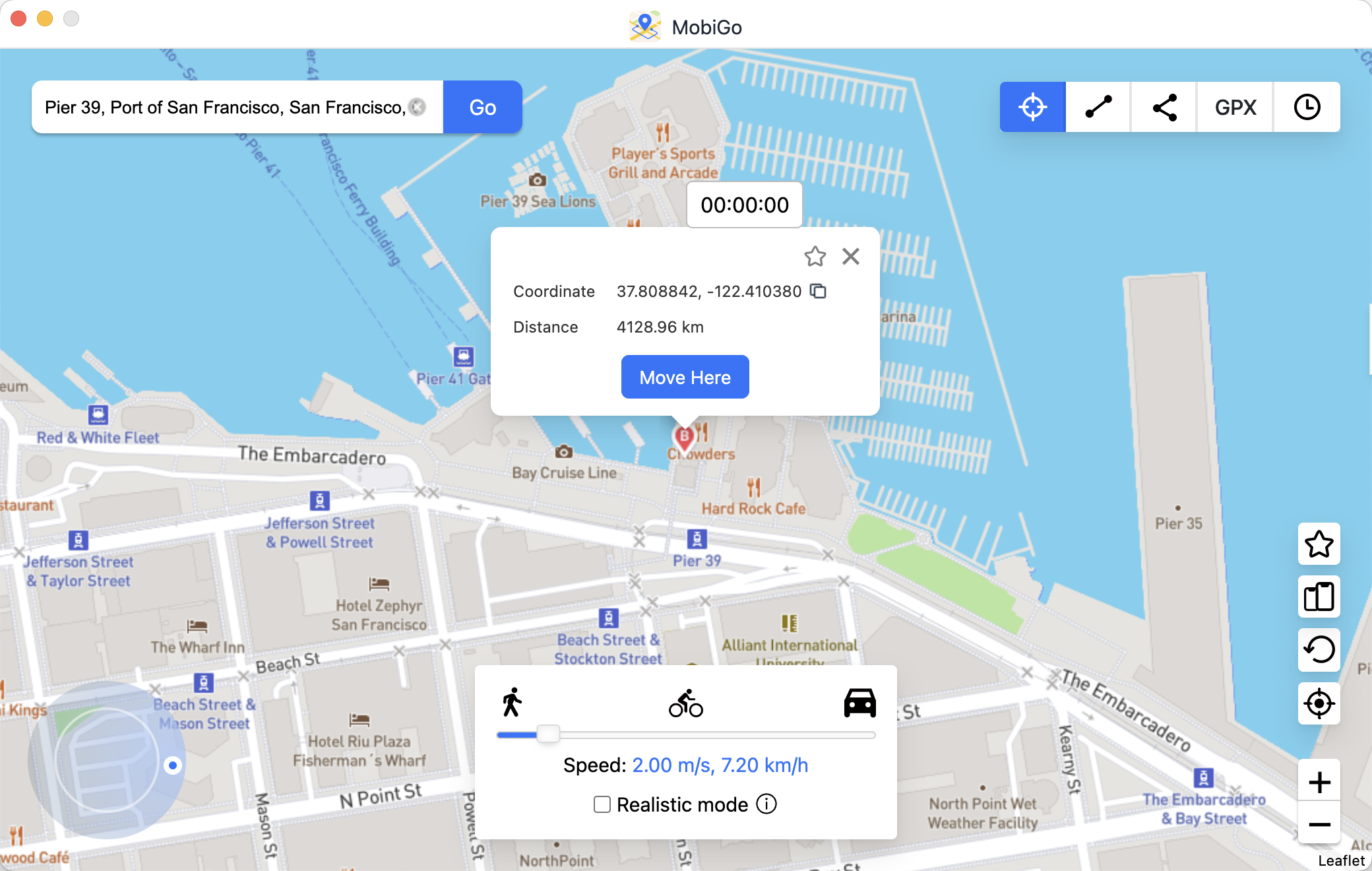
- नक्सामा कुनै पनि स्थानमा पिन तान्न वा विशिष्ट GPS निर्देशांकहरू प्रविष्ट गर्न MobiGo को टेलिपोर्ट मोड प्रयोग गर्नुहोस्।
- "यहाँ सार्नुहोस्" मा क्लिक गर्नुहोस् र MobiGo ले तपाईंको उपकरणको स्थान चयन गरिएको स्थानमा परिवर्तन गर्नेछ।
- कुनै पनि स्थान-आधारित एप खोल्नुहोस्, र तपाईंले आफ्नो सेटिङहरू अनुसार आफ्नो आईफोनको स्थान अद्यावधिक गरिएको देख्नुहुनेछ।
- आवश्यक परेमा, हिड्ने, ड्राइभिङ गर्ने, वा साइकल चलाउने अनुकरण गर्न समायोज्य गति भएको मार्ग सेट गर्न MobiGo प्रयोग गर्नुहोस्।
3. निष्कर्ष
आईफोनमा एयरप्लेन मोड वायरलेस सञ्चारहरू द्रुत रूपमा असक्षम पार्नको लागि उपयोगी सुविधा हो, तर यसले स्थान सेवाहरू पूर्ण रूपमा बन्द गर्दैन। GPS ले स्वतन्त्र रूपमा काम गर्न जारी राख्छ, र स्थान-आधारित एपहरूले अझै पनि तपाईंको स्थिति पत्ता लगाउन सक्छन्, यद्यपि Wi-Fi र सेलुलर त्रिकोण जस्ता नेटवर्क-आधारित वृद्धिहरू अस्थायी रूपमा असक्षम पारिएका छन्। प्रयोगकर्ताहरूका लागि जो आफ्नो आईफोनको स्थानमा पूर्ण नियन्त्रण चाहन्छन्, चाहे गोपनीयता, परीक्षण, वा सामग्री पहुँचको लागि होस्,
AimerLab MobiGo
यो एक शक्तिशाली र सुरक्षित समाधान हो। MobiGo मार्फत, तपाईंले आफ्नो GPS स्थान नक्कल गर्न सक्नुहुन्छ, यथार्थपरक चालको नक्कल गर्न सक्नुहुन्छ, र आफ्नो उपकरणलाई जेलब्रेक नगरी GPS त्रुटिहरू समाधान गर्न सक्नुहुन्छ।
- "अपग्रेड गरिएको आईफोन वा अब आईफोन मिररिङले काम गरिरहेको छैन" कसरी समाधान गर्ने?
- कसरी समाधान गर्ने आईफोन त्रुटि ७५?
- आईफोन iOS १८ मा पासवर्ड कसरी फेला पार्ने?
- मेरो आईफोन किन बज्दैन? यसलाई समाधान गर्न यी प्रभावकारी समाधानहरू छन्
- मेरो आईफोन गलत स्थान फेला पार्नुहोस् कसरी ठीक गर्ने?
- आईफोनमा कसैको स्थान कसरी अनुरोध गर्ने?
- आईफोनमा पोकेमोन गोलाई कसरी स्पूफ गर्ने?
- Aimerlab MobiGo GPS स्थान स्पूफर को सिंहावलोकन
- तपाईको आईफोनमा स्थान कसरी परिवर्तन गर्ने?
- iOS को लागि शीर्ष 5 नक्कली GPS स्थान स्पूफरहरू
- GPS स्थान खोजकर्ता परिभाषा र स्पूफर सुझाव
- Snapchat मा आफ्नो स्थान कसरी परिवर्तन गर्ने
- iOS उपकरणहरूमा स्थान कसरी फेला पार्न/साझेदारी/लुकाउने?